Cursor Pro Pricing Breakdown: Costs and Tiers in 2026

You're deep into a coding marathon, and suddenly your IDE asks for more money. That's the frustration with Cursor Pro's pricing for developers in 2026. The service, which offers a variety of features, has a pricing model that can be both beneficial and limiting depending on your usage level. In this analysis of Cursor Pro's pricing, we'll break down the costs, subscription tiers, and hidden aspects of Cursor's pricing structure.
Price Per Use: The Number That Matters
Understanding the cost per use of Cursor Pro is crucial for developers managing budgets. At $20 per month for the Pro tier, you get unlimited completions, but there's a cap of 500 fast requests. For a developer who sends about 100 requests daily, this quota would run dry in just five days. That's about $0.04 per fast request, assuming you maximize the 500 fast requests. Once you exceed this, you're stuck with slower processing speeds unless you jump to the Business tier at $40 per user per month. This means if you reach the limit on day five, you're facing 25 days of reduced productivity or considering a 100% increase in cost to upgrade.
| Tier | Monthly Cost | Estimated Uses | Cost Per Use |
|---|---|---|---|
| Basic | $0 | 2000 completions | $0 |
| Pro | $20 | 500 fast requests | $0.04/request |
| Business | $40/user | Unlimited requests | Varies |
The Business tier offers unlimited requests, but at $40 per user, it doubles the cost of Pro. Heavy users needing speed and volume will find Pro's 500 fast request cap limiting, making the Business tier more appealing despite the higher price. Considering the monthly cost of $40, if a developer utilizes the unlimited feature extensively, the cost per use can decrease significantly, potentially justifying the higher upfront expense.
Subscription Tiers: A Closer Look
Cursor's pricing tiers are designed to cater to different user needs, but they come with their own sets of challenges and benefits. Here's a thorough look at each tier:
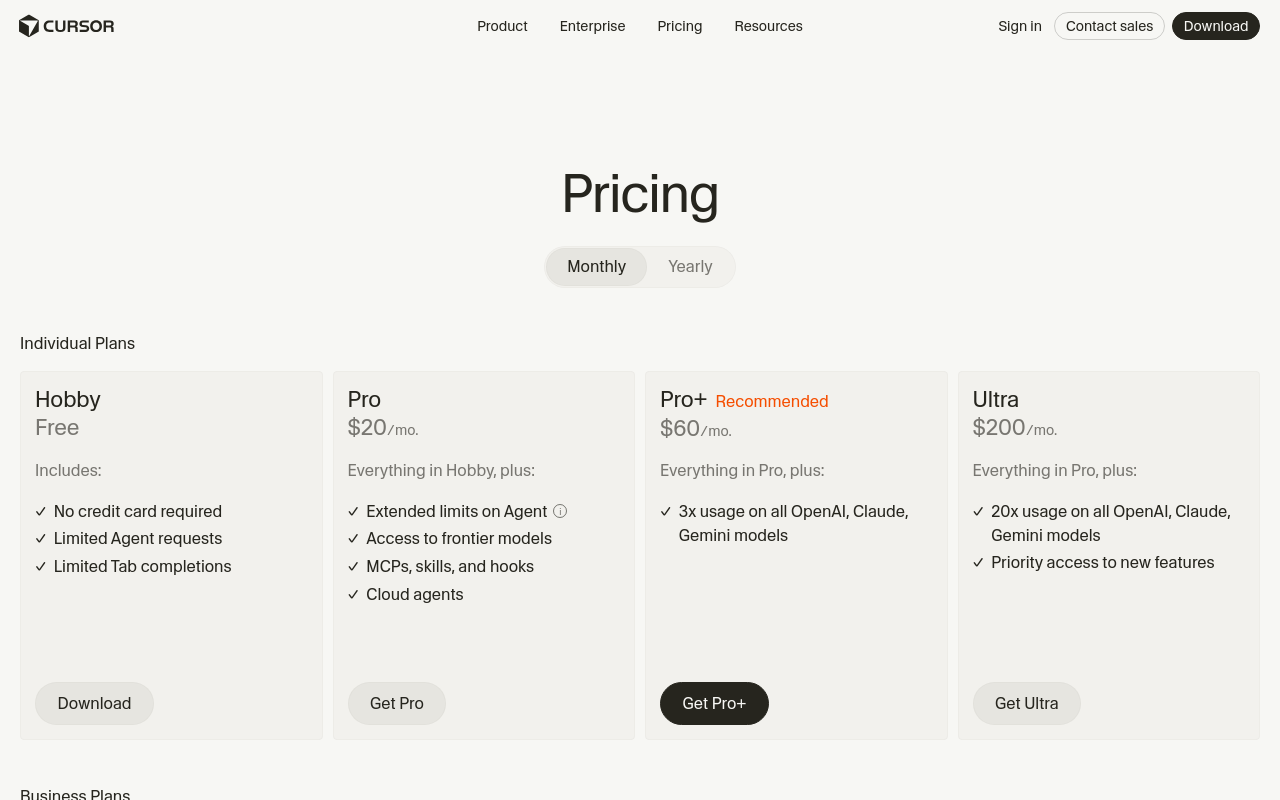
| Tier | Monthly Cost | Completions | Fast Requests | Key Features | Target User |
|---|---|---|---|---|---|
| Basic | $0 | 2000 | 50 | Basic code completion | Hobbyists |
| Pro | $20 | Unlimited | 500 | Fast requests, command line tools | Individual Developers |
| Business | $40/user | Unlimited | Unlimited | Centralized billing, admin features | Teams and Enterprises |
The Pro tier is attractive for solo developers who need more than the Basic tier offers but don’t require the administrative features or the volume of the Business tier. However, if you frequently hit the fast request limit, the Business tier becomes necessary. The Pro tier's $20/month can add up quickly, particularly if you're working on extensive projects and need to scale up to Business for speed. For example, a team of five developers would see their monthly costs jump from $100 to $200 with a shift from Pro to Business, but this ensures no interruptions in workflow, which can be critical during tight deadlines.
The Basic tier is great for hobbyists or those testing the waters, but its limits mean you'll quickly outgrow it if you start developing seriously. For many, the Pro tier will serve as a sweet spot, but its value diminishes if fast requests are a priority. The requirement to manage requests carefully can become a burden, especially under tight project timelines.
Basic Tier: Stress Test
Testing the limits of the Basic tier reveals its constraints. Officially, you get 2000 completions and 50 fast requests per month. In practice, these limits are strict, with no real workaround except to upgrade or create multiple accounts (which violates terms of service). For daily users, this means you can realistically use the Basic tier for basic tasks or learning, but not for any significant project work. Imagine trying to debug a complex program only to hit the request ceiling halfway through—frustrating, to say the least.
| Limit | Official Cap | Actual Behavior | Workaround |
|---|---|---|---|
| Completions | 2000 | Caps at 2000 exactly | None (must upgrade) |
| Fast Requests | 50 | Slows after 50 | None (must upgrade) |
Most users will find themselves needing to upgrade within a few days of regular use. The Basic tier is really just a trial mode, giving you a taste but requiring a move to Pro or Business for any sustained development effort. The lack of daily resets means strategic use of completions is essential, but frustrating if you're on a tight project deadline. If a user finds themselves at the limit within the first week, the remaining three weeks of the month can feel unbearably slow and inefficient.
API Pricing Breakdown
Cursor offers a solid API built around GPT-4o and Claude Sonnet, but how does it fare in terms of cost? Here’s a breakdown of pricing for various workflows:
| Model | Input Cost | Output Cost | Workflow Example | Cost Per Workflow | Best Value |
|---|---|---|---|---|---|
| GPT-4o | $0.001/token | $0.002/token | Chatbot | $0.20/100 tokens | High volume |
| Claude Sonnet | $0.002/token | $0.003/token | Content Generation | $0.50/100 tokens | Quality output |
For API users, GPT-4o is the more economical choice for high-volume tasks like chatbots and data analysis due to its lower per-token cost. However, if your focus is on quality, Claude Sonnet might be worth the extra expense for content generation or code review. The choice between the two models depends significantly on whether you prioritize quantity over quality. For instance, if a project involves generating detailed technical documentation, Claude Sonnet's higher cost might be justified by its superior output quality.
What the Pricing Page Doesn't Say
Cursor's pricing page omits several crucial details that can affect your decision. One notable absence is the mention of rate limits, particularly for the Pro tier’s fast requests. While the page highlights the 500 fast requests, it doesn’t specify what happens once you exceed this limit—essentially, you drop to slower processing speeds unless you upgrade. This lack of transparency can catch users off guard, especially when speed is of the essence. Developers might find themselves scrambling for solutions mid-project, which is less than ideal.
Additionally, features like bandwidth and storage costs are not detailed, which could lead to unexpected charges for high-volume users. Enterprise features and regional pricing differences are also not transparent, potentially complicating budgeting for international teams. It's crucial for teams operating across borders to have a clear understanding of any potential extra costs.
Another pitfall lies in the annual contract terms. While annual payments can offer discounts, they lock you in, which might not be ideal if your usage fluctuates or if you anticipate scaling up or down. Always read the fine print before committing to long-term contracts. No one wants to be stuck in a year-long plan that no longer meets their needs.
Head-to-Head: Price vs Competitors
Comparing Cursor with competitors reveals distinct cost differences. We'll look at three tools, each offering similar functionality:
| Tool | Monthly Cost | Completions | Fast Requests | Cost Per Use |
|---|---|---|---|---|
| Cursor Pro | $20 | Unlimited | 500 | $0.04/request |
| Competitor A | $15 | 1500 | 300 | $0.05/request |
| Competitor B | $25 | Unlimited | Unlimited | Varies |
| Competitor C | $30/user | Unlimited | 1000 | $0.03/request |
Cursor offers a middle ground in terms of cost-per-use. While Competitor A is cheaper, its limits are stricter. Competitor B offers unlimited fast requests but at a higher cost, making it suitable for teams needing volume without worrying about limits. Competitor C, though more expensive, provides a more balanced offering with a lower cost per request for heavy users. If your team frequently hits limits, the higher cost of Competitor C might be worth the investment.
Who Should Pay What
Choosing the right plan depends on your specific needs and usage patterns. Here’s a breakdown of recommended plans for various user personas:
| User Persona | Recommended Plan | Monthly Cost | Annual Cost | Key Reason |
|---|---|---|---|---|
| Hobbyist | Basic | $0 | $0 | Low volume needs |
| Solo Developer | Pro | $20 | $240 | Unlimited completions |
| Small Team | Business | $40/user | $480/user | Centralized billing |
| Large Enterprise | Business | $40/user | $480/user | Admin features |
| Content Creator | Pro | $20 | $240 | Fast request quota |
| Data Analyst | Pro | $20 | $240 | API access |
For hobbyists, the Basic tier suffices, but anyone with serious project goals will find themselves moving to Pro quickly. Small teams benefit from the Business tier's administrative tools and centralized billing, essential for managing multiple users. Large enterprises, meanwhile, will appreciate the additional control and scalability. For data analysts and content creators who require specific features like fast request quotas and API access, Pro provides the necessary balance between cost and functionality.
The Verdict
Cursor Pro's pricing model offers flexibility but can become costly for heavy users. The Pro tier provides the best overall value for individual developers needing a balance of cost and functionality, though the fast request cap is a limitation. The Business tier, while pricier, removes these constraints and adds valuable team management features.
Among competitors, Cursor Pro stands out for its balance of price and features, though Competitor C offers a more attractive option for teams needing higher request limits at a slightly higher cost. Ultimately, the choice depends on your specific needs, but for most developers, Cursor Pro will provide the optimal mix of functionality and affordability. However, potential users should be cautious of hidden costs and limitations that may not be immediately apparent from the pricing page.
For more detailed information, visit the official pricing page, documentation, and the product page.
Frequently Asked Questions
What is the cost of Cursor Pro in 2026?
Cursor Pro costs $20 per month for the Pro tier, allowing 500 fast requests.
What are the different subscription tiers for Cursor Pro?
Cursor Pro offers Basic ($0), Pro ($20), and Business ($40) tiers.
How does the pricing affect productivity?
Exceeding the 500 fast requests in Pro tier leads to slower processing unless upgraded.